md-preview
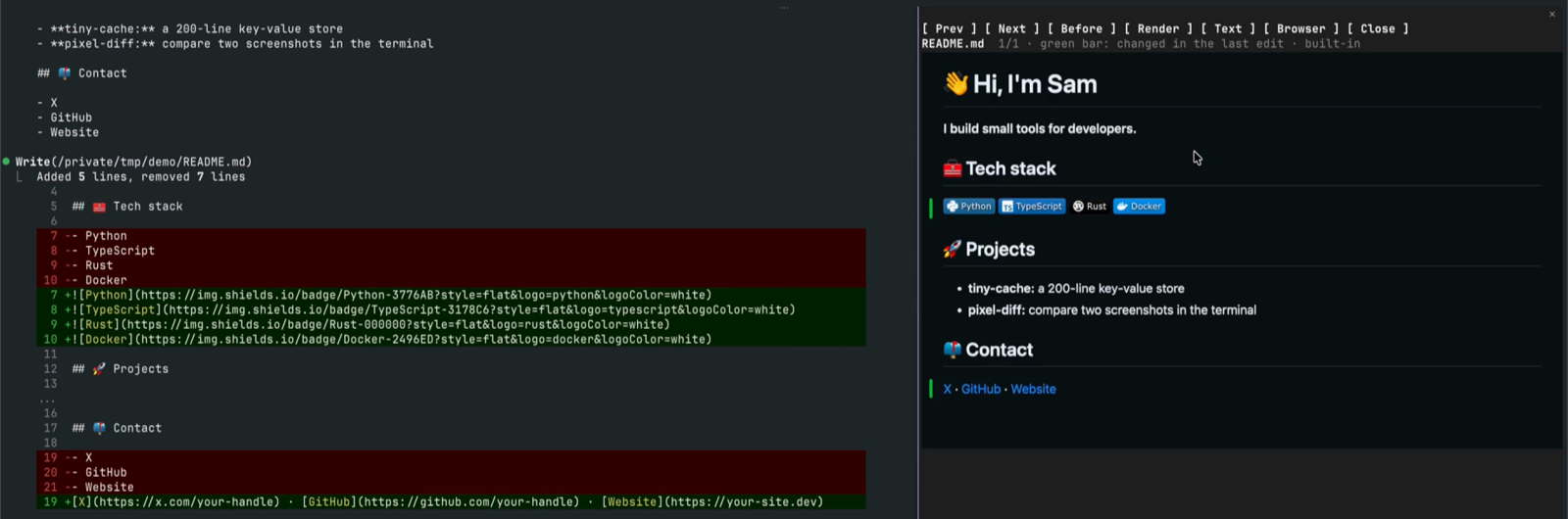
Shows the Markdown files Claude edits, rendered like GitHub, in a pane next to the chat. Before and after side by side.
Install
claude plugin marketplace add hamzafer/claude-code-mods
claude plugin install md-preview@claude-code-modsRestart Claude Code after installing. To try it without installing, clone the repo and run claude --plugin-dir mods/md-preview.
How to use
/md- Opens a pane on the latest file
/md <path>- Opens any file
/md compare <a> <b>- Two files side by side
/md open or o- Opens the page full size in your browser
n / p- Next and previous file
b- Before and after side by side
t- Page or text view
r- Render again
q- Closes it
How it behaves
- When Claude edits a .md, .mdx or .markdown file, a toast says so, once per file per turn. Files written by shell commands count too.
- Renders with GitHub's own renderer through gh api /markdown when gh is signed in, else a small built-in renderer, else a text view.
- A green bar marks the blocks the last edit changed.
- It renders the files Claude edits ahead, in the background when the turn ends, so /md opens fast.
- Scripts in the Markdown never run.
- With the GitHub renderer, the file's text goes to GitHub's API under your own gh login. Nothing else is sent anywhere.