interstellar
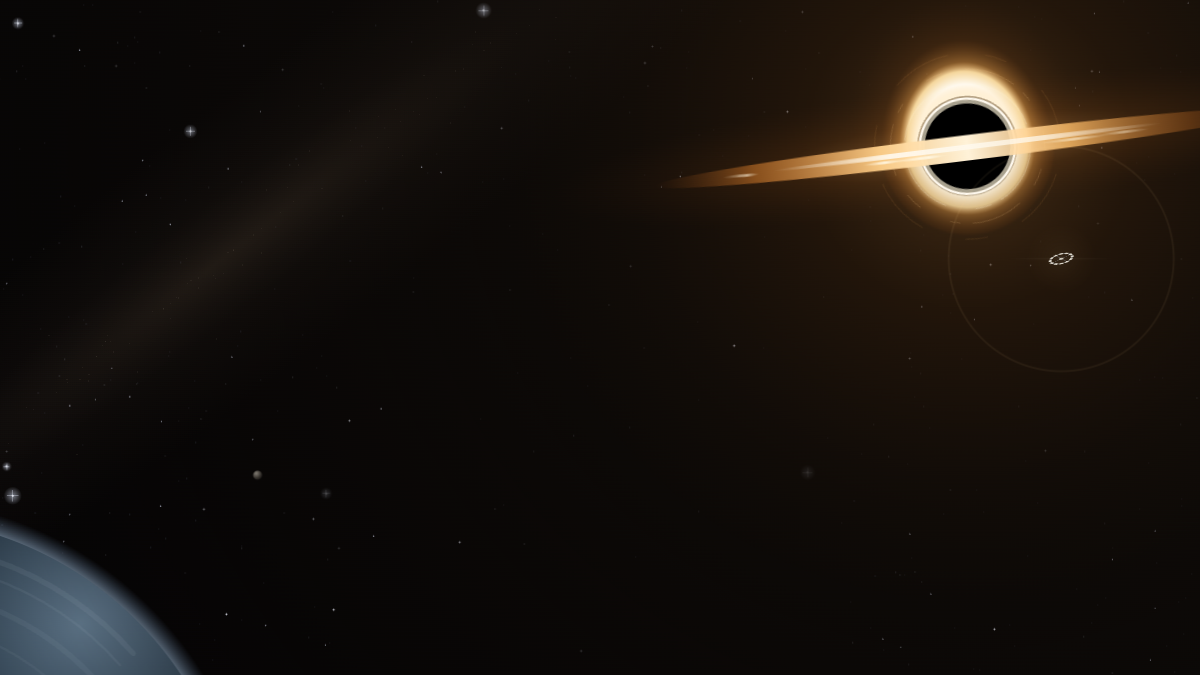
A black hole turns while Claude works. A ship holds station and hails you when it needs you.
Install
claude plugin marketplace add hamzafer/claude-code-mods
claude plugin install interstellar@claude-code-modsRestart Claude Code after installing. To try it without installing, clone the repo and run claude --plugin-dir mods/interstellar.
How to use
- Nothing to run. Start a local session in the Code tab of the Desktop app and send a message: deep space opens behind the chat.
- To take the look off, turn the mod off, start a new session, then open Settings, search for
code appearanceand choose Remove colors.
How it behaves
- While Claude works, a black hole sits in the upper right: a pitch-black shadow, a thin photon ring, lensed light bending over the top, and a bright disc crossing in front with knots of light running along it. Stars twinkle and drift, an ice planet's limb fills the lower left corner, and a tiny ring ship crosses the sky on a long arc toward the hole.
- When Claude needs you (its turn ended, it asks you a question, or a permission prompt is still waiting after 1.5 seconds), the ship holds station below the black hole and blinks its beacon, sending amber rings out from itself. The photon ring burns hotter and pulses, and a handful of shooting stars streak past.
- Every time is new: each wait throws its own shooting stars.
- There is no event for the moment you approve a permission prompt, so after you approve one the needs-you scene stays until that tool finishes. Background subagents and other plugins' tool calls never change it.
- Deep-space black with an amber accent, dark mode only. The terminal draws no theme, so there it does nothing. Your system's reduced-motion setting stills the sky and hides the shooting stars.