secret-guard
Keeps API keys and tokens out of Claude's context, your files and your commits.
Install
claude plugin marketplace add hamzafer/claude-code-mods
claude plugin install secret-guard@claude-code-modsRestart Claude Code after installing. For 150+ more rules, also brew install gitleaks. To try it without installing, clone the repo and run claude --plugin-dir mods/secret-guard.
How to use
/secret-guard- Shows the scanner in use and what it hid or held this session
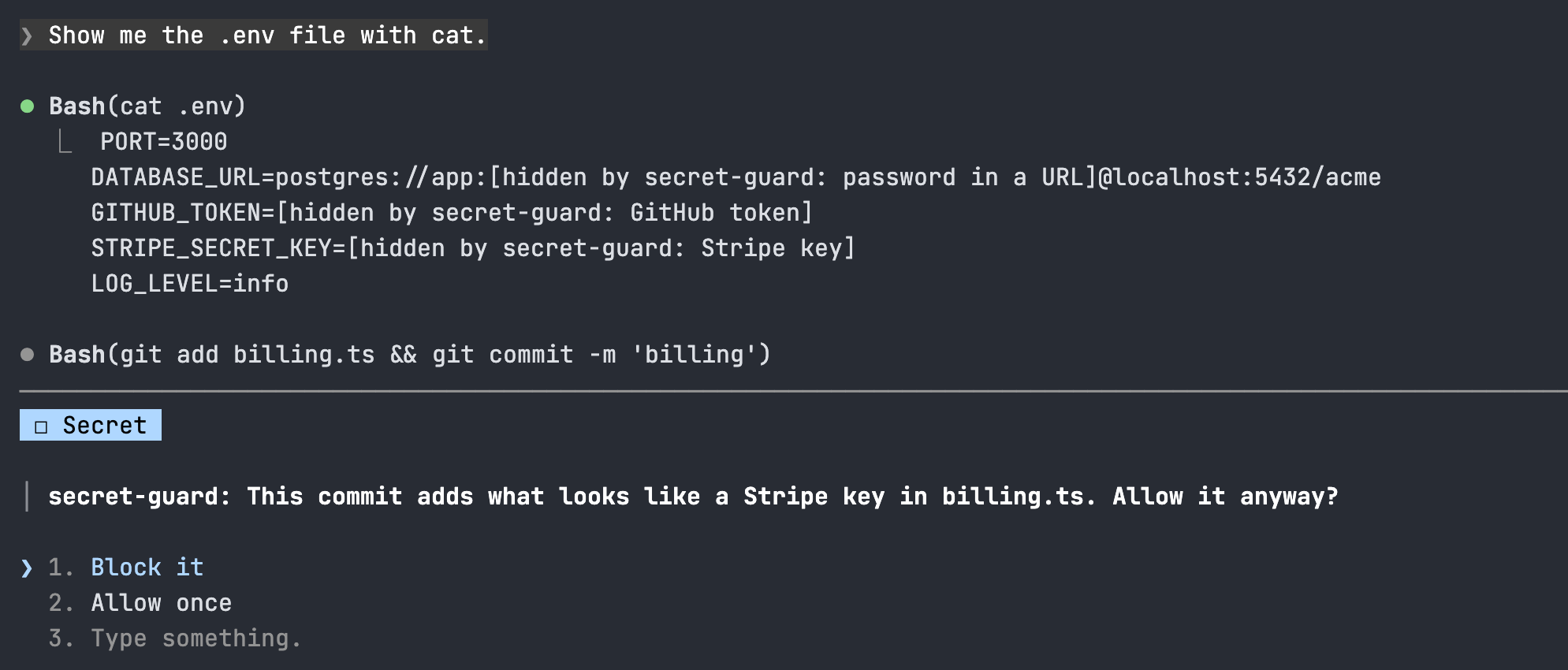
Block it- Refuses the write, commit or push. Allow once lets it through this time
redactOutput- Hide keys in tool output (on). Change it in /config
useGitleaks- Add gitleaks's rules when it's installed (on)
How it behaves
- A key in what a tool returns (cat .env, env, a file read, an MCP answer) becomes [hidden by secret-guard: GitHub token] before Claude reads it. It never reaches the model or the transcript.
- A Write or Edit that adds a key asks first. A file git ignores, like .env, goes through with a toast.
- A write that would bring the label into a file is refused, so the real key isn't overwritten.
- git commit scans every change since the last commit, plus the new files the same command's git add stages (every new file when its paths can't be read for sure). git push scans each local commit no remote has yet, a detached HEAD's too. Files marked binary in .gitattributes are read as text, so the mark can't hide a key.
- Asks and toasts name the kind of key and the file, never the key.
- gitleaks runs on your machine from a neutral folder, so a repo can't switch it off. Nothing is sent anywhere.
- A command you run yourself with ! and a file you attach with @ go straight to Claude. A shell command that writes a file isn't checked like a Write.